
Build the schedule once. Stop defending it all week.
NumaTrack Scheduling lets you create, assign, and share shifts across teams and locations — with confirmed availability, automatic conflict detection, and time tracking built in. Employees check their phone. Managers move on.
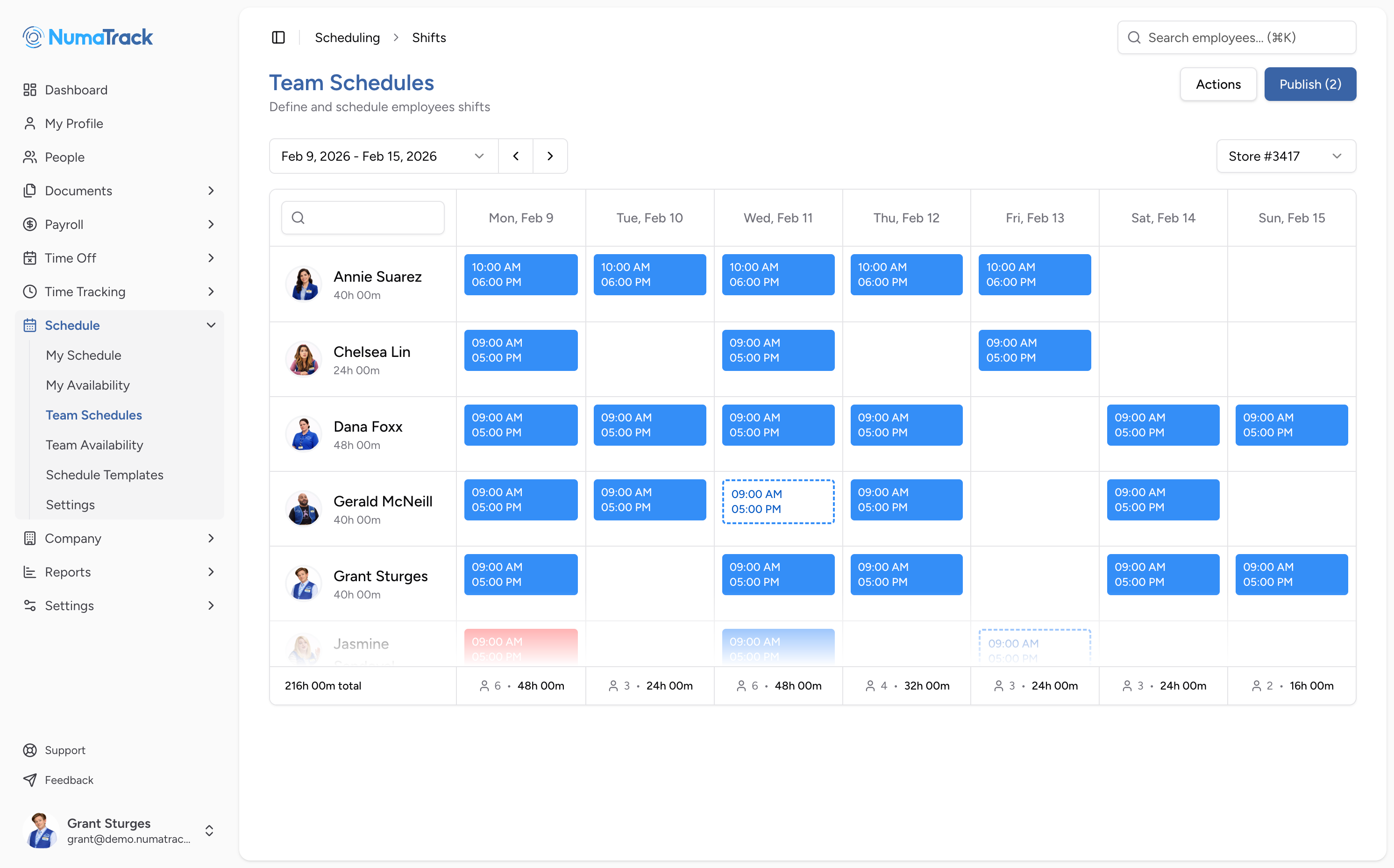
Everything you need to schedule your team and keep shifts covered
Shifts built fast and reused easily
The problem: Building a schedule means juggling availability, locations, and roles — then rebuilding it again next week. Changes trigger a chain of messages. By the time everyone's confirmed, something has already shifted.
What changes: Create shifts with start and end times and assign them individually or across multiple dates. Save shift templates for recurring patterns. Copy an entire schedule forward to the next week or cycle. Build once, reuse often.
Availability confirmed before you build
The problem: Managers ask when people can work. Answers come back inconsistently — or not at all. Scheduling without reliable availability leads to no-shows and last-minute scrambles.
What changes: Employees submit preferred and unavailable times through the app. Managers review and approve before building the schedule. Shifts are assigned against confirmed information, not assumptions.
Conflicts flagged before you publish
The problem: An employee gets double-booked. Someone is assigned during a time they marked unavailable. A shift overlaps with approved time off. Nobody catches it until the day of.
What changes: Double bookings, unavailable times, and time-off overlaps surface the moment you assign a shift. Fix conflicts before the schedule goes out — not after someone doesn't show up.
Every location in one schedule
The problem: Multiple locations mean separate schedules — different tools, different tabs, different files. Seeing full coverage across sites requires stitching things together manually.
What changes: Schedule employees across locations from a single view. Filter by location to focus. See coverage across all sites without switching tools or merging anything.
No more "when do I work?" messages
The problem: Printed schedules get lost. Group messages are noisy. Employees call in to check their shifts. Managers spend time answering scheduling questions instead of running the floor.
What changes: Published schedules appear instantly in the mobile app — upcoming shifts, times, and locations. Late clock-in notifications alert managers when someone hasn't started on time.
Scheduled hours vs. actual hours — side by side
The problem: Scheduling and time tracking live in separate systems. Managers can't tell if someone clocked in on time without cross-referencing. Early arrivals and late starts go unnoticed.
What changes: Employees clock in against their scheduled shift. Early clock-in tolerance prevents premature punches. Late clock-in notifications flag missed starts. Scheduled and actual hours sit side by side — no cross-referencing needed.
Scheduling at your fingertips
How teams use Scheduling across industries
Retail & Hospitality
Recurring weekly templates with per-shift adjustments. Employees submit availability from their phone. Conflict detection catches double bookings across locations before shifts go out.
Construction & Trades
Assign crews to projects and sites for specific dates. Multi-location scheduling keeps job assignments visible across the company. Clock-in ties hours directly to the scheduled shift.
Professional Services
Schedule client-facing or on-site staff alongside office teams. Copy schedules forward for recurring engagements. Availability approval confirms commitments before work is planned.
Healthcare & Social Services
Complex shift patterns across multiple locations. Conflict detection prevents double bookings during shift changes. Late clock-in notifications flag coverage gaps immediately.
Nonprofits & Small Organizations
Simple shift scheduling for part-time or variable-hour teams. Employees check their phone for shifts. No printed rosters, no group messages.
30 minutes. No commitment. See Scheduling in action.
If building your weekly schedule is still a manual process — and defending it takes even longer — this is worth a look. Book a walkthrough and see how NumaTrack handles shifts, availability, and coverage.