
Payroll day shouldn't be the worst day of your week.
NumaTrack Payroll handles CPP, EI, provincial taxes, statutory holiday pay, WCB premiums, ROEs, T4s, and CRA remittances natively. Hours and time off are already in the system. Review, confirm, done.
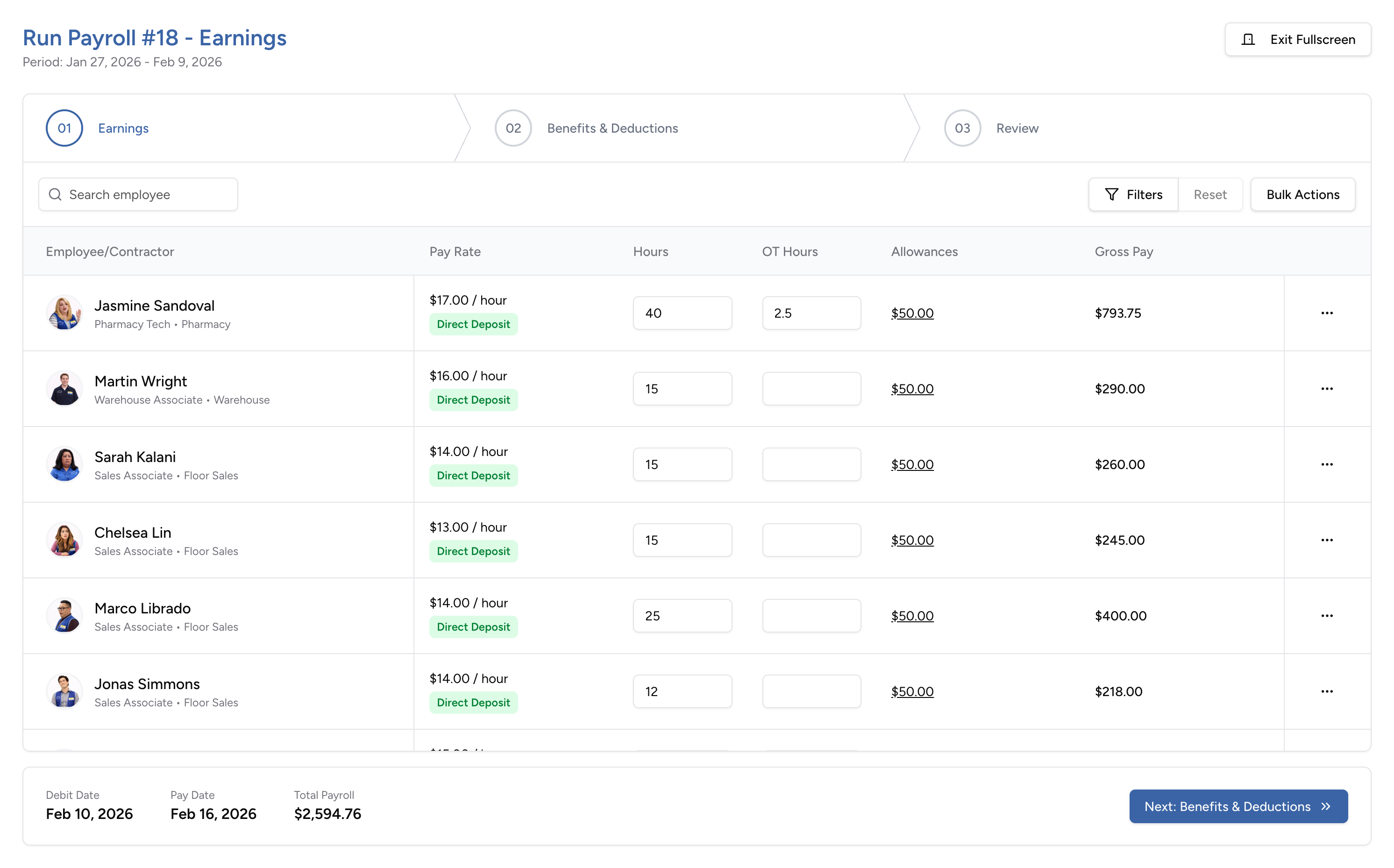
Everything you need to run payroll correctly in Canada
CPP, EI, WCB, and statutory holiday pay you don't have to second-guess
The problem: Canadian payroll means federal and provincial tax calculations, CPP and EI with annual maximums, WCB premiums that vary by rate group and provincial board, and statutory holiday pay where qualifying rules and averaging periods differ by province. Tools that weren't built for Canada make all of this harder, not easier.
What changes: CPP and EI calculate automatically with current rates and maximums. Provincial taxes apply based on the employee's location. Statutory holiday calendars are pre-loaded per province — the system determines qualifying criteria and calculates pay automatically. WCB premiums calculate per employee based on rate group and assessable earnings, with reporting data ready for your provincial board. You review the numbers. The system does the math.
ROEs, T4s, and remittances that don't slip through
The problem: ROEs are due within five days of an interruption of earnings. T4s and T4As are due every February. CRA remittances follow their own schedule. Each has its own deadline, and missing any of them means penalties.
What changes: ROEs generate automatically at termination. T4 and T4A year-end forms are produced from the same payroll data you've used all year. CRA remittances are automated. Deadlines stop being a scramble.
Hours and time off already waiting when you open payroll
The problem: Timesheets are in one place. Time-off balances are in another. Payroll is in a third. Someone pulls it all together, keys it in, and hopes nothing was missed. Errors surface on pay stubs.
What changes: Approved timesheets — regular hours, overtime, project hours — sync into payroll automatically. Time off is already accounted for. Vacation pay accrues on its own. When you open a payroll run, the data is there.
Multiple entities, schedules, and rates — without separate systems
The problem: Different entities, pay schedules, or pay rates usually mean separate payroll files or tools. Each one adds setup, data management, and room for error.
What changes: Run payroll across multiple entities from one account. Assign different pay schedules — weekly, biweekly, semi-monthly — to different groups. Support multiple pay rates per employee. Handle regular and off-cycle runs in the same place.
Pay stubs and direct deposit — no printing, no requests
The problem: Printing cheques and distributing pay stubs takes time. Employees ask HR for copies. Direct deposit changes require manual updates outside the system.
What changes: Pay employees by direct deposit. Pay stubs generate automatically with year-to-date tracking. Employees view and download them from the app. Bank details are stored encrypted in the employee profile.
Employees and contractors paid in one run
The problem: Contractors are paid outside the system — by invoice, by manual transfer, or through a separate process. T4As are generated separately. There's no unified view of labour costs.
What changes: Pay employees and contractors in the same payroll run. T4As generate alongside T4s at year-end. Total labour costs are visible across both groups in one place.
Payroll from any device
How teams use Payroll across industries
Retail & Hospitality
High-volume hourly payroll with provincial overtime already calculated. Timesheets sync in. Statutory holiday pay and WCB premiums apply automatically. Direct deposit and mobile pay stubs eliminate paper.
Construction & Trades
Multiple pay rates for different roles and projects. WCB premiums calculated by rate group. Multi-entity support for separate legal entities. Contractor payroll and T4As alongside employee payroll in one run.
Professional Services
Salaried and contractor payroll on different schedules. Project hours flow in from timesheets for cost tracking. T4 and T4A processing at year-end uses the same data from every run.
Healthcare & Social Services
Shift-based payroll with overtime, statutory holiday pay, and WCB premiums handled automatically. Multiple pay schedules for full-time, part-time, and casual staff. ROEs generate when needed — not days late.
Nonprofits & Small Organizations
Run payroll without a bookkeeper. CPP, EI, taxes, and remittances are calculated by the system. T4s and ROEs generate from the data already there.
30 minutes. No commitment. See Payroll in action.
If payroll day means pulling data from three places and hoping the math is right — book this walkthrough. See how NumaTrack runs Canadian payroll from approved timesheets to direct deposit.